Posts

Configuring Cisco CME Voice Gateway (VG) for incoming and outgoing calls using Sipgate trunk

Image
Hi All For my reference and your's, here is a working sample configuration for configuring sipgate (sipgate.co.uk) for incoming and external VOIP calls on a 2800 series Cisco router. Using GNS3; My wireless adapter has internet connection sharing enabled, and I have created a loopback adapter which is the 'internet' adapter as you can see below. I have tested making calls using Cisco's CIPC version 8 and receiving calls. This doesn't have to be done in GNS3, just pick up yourself a real voice gateway. version 12.4 service timestamps debug datetime msec service timestamps log datetime msec no service password-encryption ! hostname VG-EP ! boot-start-marker boot-end-marker ! ! aaa new-model ! ! aaa authentication login http local aaa authentication login ssh local aaa authorization exec http local ! aaa session-id common ! resource policy ! memo...

Connecting to Cisco Virtual Wireless Controller Console within VM Workstation

Connect to your Cisco vWLAN via console within VM Workstation 9; Turn off your VM Go into the Settings of your VM Within the Hardware tab, Select Add.  Select Serial Port Click Create / Use a Named Pipe.  Make sure these are selected for the Named Pipe \\.\pipe\com_x (x being 1, 2, 3, 4, etc). This end is the server The other end is an application Save all changes and power on VM.  Open up Putty Click Serial Type in Named Pipe. Thats it - it should connect. Works for me. Have fun. 

Rightfax - Unable to send fax

When trying to send a fax as an email, you are presented with the following message from Rightfax. Your fax has not been sent. The gateway was unable to validate the e-mail address of the message sender. The message has been discarded. Open up RightFax Enterprise Fax Manager, go into users and ensure there is an email address entered in for the user who are sending a fax as.

How to change link, hover & visited CSS Styles within a div

Create your div and name it appropriately and place a hyperlink in it, and then in the CSS, apply the following; #mydiv A:link,#mydiv A:hover,#mydiv A:visited { color:#ffffff; }   This then prevents the changing of colours of other links outside of that specific DIV.

Incoming mail problems - document libraries within SharePoint 2010

Image
I followed TechNet articles so I would be able to email my document libraries however something did not work. I created a host record for my SharePoint Web Front end, and named it SP to receive email. When I tried emailing my Document Library, I received the message; Delivery has failed to these recipients or groups: mydocs@sp.mydomain.local The recipient e-mail system can't process this message now. Please try resending the message later. However, to fix the issue highlighted in red, I changed the SMTP Domain name and it worked instantly!   My References: http://technet.microsoft.com/en-us/library/cc287879%28v=office.14%29.aspx http://sharepointgeorge.com/2010/configuring-incoming-email-sharepoint-2010/ - Screenshots! I spent several hours on this, small detail! I suppose my next issue is external email. Hope this helps one of you out here!!

Configuring WCS alarm notifications

Follow these steps to configure alarm notifications on your WCS. Log into WCS Click Administration then Settings Click Configure Mail Delivery Settings ( Can't remember the actual name, will modify) Configure all necessary SMTP settings Tick ‘Apply recipient list to all alarm categories’ Click Test Make sure the settings are still there after testing Click Save Check settings are still there Click ‘Configure email notification for individual alarm categories’. Click the Alarm Category (not necessary, dependant on alert type)                                                                i.       Adjus...

Sql 2008 Cluster - Add Node Error

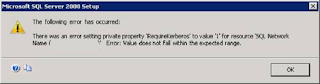
Image
During the end of the installation for configuring a new cluster with the SQL 2008 Enterprise installation,  the following error was shown; The following error has occurred; There was an error setting private property 'RequireKerberos' to value 1 for resource 'SQL Network Name () Error: Value does not fall within the expected range. The solution to is to register the SPN of the user account you created to run the services. Open up the Command Prompt and type the following; setspn -L mynet\sqlservice setspn -s MSOLAPSvc.3/sqlcluster:cluster1 mynet\sqlservice setspn -s MSOLAPSvc.3/sqlcluster.mynet.local:cluster1 mynet\sqlservice setspn -s MSSQLSvc/sqlcluster:cluster1 setspn -s MSSQLSvc/sqlcluster.mynet.local:cluster1 sqlcluster is the name of my SQL cluster set during the SQL installation and cluster1 is the name of my instance. Once you have done this, make sure all computer accounts used in Cluster are enabled for Kerberos Delegation and that the user service...