Posts

Create bootable CUC CUCM CUP Image / ISO

The following script allows you to automatically create a bootable CUCM/CUC/CUP image without the need for any paid for software when you only have access to the update outside of put or the datastore for the new server. I have spent several hours on this, but I just wanted to make it simple. Only really for lab purposes, the checksum will fail due to the ISO being manipulated but essentially once you fill in the variables, you will just be left with a single ISO file in the staging directory. To use; 1. Download the mkisofs.exe file as described in the script 2. Paste script below into Powershell ISE Script Editer 3. Modify the variables 4. Execute the script. Simple. Tested creating an ISO on a Windows 10 machine and running the ISO on a ESXI server. Thanks for this guy Aaron Harrison as per the URL, was helpful in the finding out the mkisofs.exe command syntax. http://www.ipcommute.co.uk/technical-articles/17--creating-isolinux-boot-dvds-with-free-software-cucm-uccx-c...

UCCX Phone Books - Powershell

The UCCX Server Documentation API for Phonebook's was slightly out of date, so I have referenced in my blog for future use. Download Phone Book - (4 being the ID of the phone book) https://servername.com:8445/finesse/api/PhoneBook/4/Contacts/csvFileContent if you post, you upload to the above link List specific details for a phone book https://servername.com:8445/finesse/api/PhoneBook/4/ List contacts for specific phone book https://servername.com:8445/finesse/api/PhoneBook/4/Contacts/ Import (using Powershell) $FileName = ".\pb.csv" $Password = ConvertTo-SecureString “passwordhere” -AsPlainText -Force $Cred = New-Object System.Management.Automation.PSCredential ( “username” , $password ) Obviously, this is not very secure but its simply a proof of concept to do whatever you need,  Invoke-WebRequest  -  uri   " https://servername.com:8445/finesse/api/PhoneBook/4/Contacts/csvFileContent "   -Method Put -Credential $Cred...

CUCM 11.5 - Esxi 6.5 - unable to create VM

Image
Hi Guys Had an issue where I was unable to deploy a Cisco Unified Call Manager 11.5 OVA to the VMWare Esxi 6.5 standalone server. The following error would appear during the provision of the VM - "At least one extra disk image was provided that will be ignored". The solution to import the Cisco OVA into VMware is to use VMware's OVFTool. The commands I used worked for also UCCX and Cisco Unity Connect - CUCM Deployment for 2500 Users --------------------------------- ovftool --acceptAllEulas --datastore="datastore1" -dm="thick" --name="CUCM01-PUB" --net:"eth0"="Voice" --deploymentOption="CUCM_2500" "c:\temp\cucm_11.5_vmv8_v1.1.ova" vi://UserName:Password@IPAddress UCCX ---- ovftool --acceptAllEulas --datastore="datastore1" -dm="thick" --name="UCCX1" --net:"eth0"="Voice" --deploymentOption="UCCX_400_Agent" "C:\temp\UCCX_11....

Restoring Cisco Unified Attendant Console Advanced V12

I recently had an issue where I needed to complete a restore (new build) of Cisco's Attendant Console Advanced V12 in order to satisfy testing criteria. I followed Cisco's documentation (CUACA_120101_Install-Guide.pdf) however the steps were not completely clear. The solution that I am working with here is a standalone deployment. Delete all devices and numbers related to Cisco Attendants Console in CUCM. These include; CT Gateway Devices Service Devices Park Devices CTI Route Points Numbers related to the above (directory number in CUCM) You may need to refer to your low level design to find this information out. In the CUCM, the descriptions for these devices are prefixed with ASD. The devices are names are prefixed with PD, SB, GB and RB.  Setup new server using OVA Install the same Windows OS Ensure the hostname of the new server matches the name of the old server Restore the CUACA crypto keys including aeskey.dat - these need to be taken from the live publis...

Convert IMCEAX to X500 Address for NDRs

Paste this into Powershell ISE and modify accordingly. This script will replace all parts of a problematic X500 address into a readable format when an NDR is delivered. Example IMCEAEX value - IMCEAEX-_o=EXCH_ou=Exchange+20Administrative+20Group+20+28FYDIBOHF23SPDLT+29_cn=Recipients_cn=d8d4ee95afb-Squirrel+20Success@blogger.com $x = Read-host 'Enter IMCEAEX full value' $x = $x -replace "IMCEAEX-_", "X500:/" -replace "\+20", " " -replace "\+28", "(" -replace "\+29", ")" -replace "_", "/" -replace "\+2E", "." -replace '@.*', '';cls;Write-output $x 

Understanding VLAN Access Filters

Image
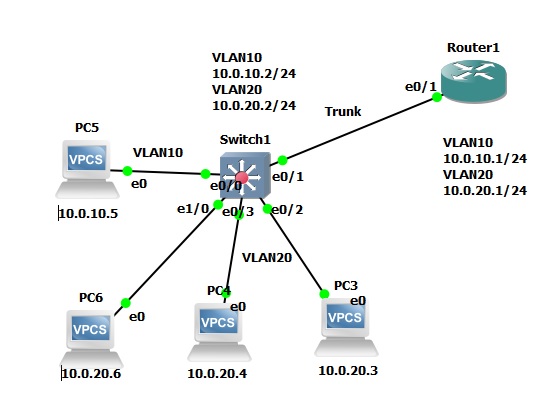
Evening All I've spent a few days trying to get my head around VLAN Access-Maps and VLAN Access-Filters. I am sharing my configuration which works fine in my GNS3 lab. This is not been tested in a production environment so I would advise caution and some thorough testing before bringing into a live environment. So above is my test environment for VLAN Filters. Layer three is done on Router 1. I did actually try it on the L2 Switch however I couldnt get intervlan routing working so I had to use the Router. This is what is allowed  - Communication both ways between 10.0.20.4 and 10.0.20.3 Communication both ways from 10.0.20.0/24 to 10.0.10.5  I have provided a limited output of the switch. Basically, I am covering the access-lists, VLAN configuration and interface configuration for review. If you don't create the MAC access-list and apply it to the VLAN access-map, then the endpoints will not learn the IP address of the other end points. You can be restrictive an...

Windows 10 Wireless connection asking for proxy server credentials

Image
When using Windows 10 on a domain network, the wireless may show attention required and upon clicking the wireless connection name it disconnects and states "enter proxy server sign-in info". In the background, the client machine is making a connection to msftconnecttest.com/connecttest.txt. As the computer is not authorised to use the internet, but rather the user this was the cause of the popup. I whitelisted the domain msftconnecttest.com for computer authenication and now the wireless connects with no requests for further authentication.

Configuring Oracle 12c backups on Veritas Backup Exec 16.

Image
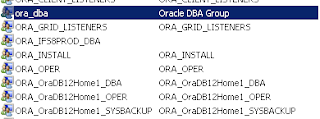
This is a short guide to configuring backups of Oracle 12c using Veritas Backup Exec 16. 1.        Establish trust with Oracle Database server within Backup Exec console and ensure agent is installed. 2.         Create a login to the database for backup purposes in Oracl e; Open up a command prompt and run the following command – Sqlplus / nolog Log in with your database admin account as sysdba Connect myusername / mypassword@databasename as sysdba CREATE USER BACKUP IDENTIFIED BY MYPASSWORD; GRANT UNLIMITED TABLESPACE TO BACKUP; GRANT AQ_ADMINISTRATOR_ROLE TO BACKUP; GRANT DBA TO BACKUP; GRANT CONNECT TO BACKUP; ALTER USER BACKUP DEFAULT ROLE ALL; ALTER USER BACKUP DEFAULT TABLESPACE SYSTEM; 3.        Within the Local Users and Groups section of Computer Management on the Oracle database server, add the backup servers windows domain adminis...

Running Office 2003 on Server 2008 R2

When trying to open documents using the file converter in Excel 2003 SP3 on Server 2008 R2, the following message is displayed "microsoft excel is waiting for another application to complete an ole action 2003" or "the converter failed to open the file". The following KB article allows this feature to work. https://support.microsoft.com/en-us/kb/980210  - KB Article http://download.microsoft.com/download/A/6/2/A624F8C9-B51E-4CC6-A0AC-ACB684E2E265/office-kb980210-fullfile-x86-glb.exe  - Direct Download

Microsoft NPS Console fails to launch

The Microsoft NPS console fails to launch. The error shown is - FX:{6630f2d7-bd52-4072-bfa7-863f3d0c5da0} NPS This was due to an issue with WMI. Running the following in Command Prompt as an Administrator resolved my issue. cd C:\Windows\System32\wbem\AutoRecover for /f %s in ('dir /b *.mof *.mfl') do mofcomp %s

Excessive TAP-Windows Adapter V9 Cleanup

I had an issue recently where the client machine could not connect to any network resources. We noticed that the user had many TAP-Windows Adapters for VPN (OpenVPN). Some research suggests it occurs due to Microsoft products activating against a KMS server. Anyway, I have created a simple vbs (wsh) script which removes the excess devices in a safely manner. All you might need to change is the location of tapinstall.exe as it might be deployed with your VPN application. I have actually deployed the script by placing it in the netlogon share and using a GPO to create a scheduled task which executes the script on a weekly basis. I used a WMI filter and only targeted laptops.  Here is the script. Its not perfect, but I think it does a good job. Dim Shell,path,tempPath,tapInstPath32,tapInstPath64,objFSO Set Shell = CreateObject ("Wscript.Shell") Set objFSO = CreateObject("Scripting.FileSystemObject") strComputer = "." count = 0 tapInstPath32 = ...

IPFX Divert to Associate keeps going back to Voicemail (CUCM - Call Manager)

Image
When setting the divert within the Outlook IPFX plugin, it keeps defaulting to 'Voicemail' and will not change to Associate or any other user configured diverts. I enabled the logging on IPFX Explorer (Log onto the server) and noticed the following logs under PBX Cisco & Data Server. SS:[14:25:52.121346] [1234] EXTN: Suspend: 30/01/2015 14:25:56¤ SS:[14:25:52.121346] [00|1501301425|19144] Failed: Extn[1234] Call Forward - Dest[] Type[0-CANCEL_FWD_ALL][Device Not Found] [-2147220491]¤ SS:[14:25:52.121346] REQ-OUT: Failed [00|1501301425|19144]¤ PBX:[14:25:52.105721] [LL:1][T:005B75A0][L:MSGS]REQUEST - [Fails] ID[00|1501301425|19144] [Extn[1234] Call Forward - Dest[] Type[0-CANCEL_FWD_ALL][Device Not Found]] PBX:[14:25:52.105721] [LL:1][T:005B75A0][L:MSGS]REQUEST - [Start] ID[00|1501301425|19144] [Extn[1234] Call Forward - Dest[] Type[0-CANCEL_FWD_ALL]] SS:[14:25:52.90095] REQ-OUT: pbxForward: DeviceID=1234, Type=0, By=MYSERVER¤VM [00|1501301425|19144]¤ If you look at...

Configuring Cisco CME Voice Gateway (VG) for incoming and outgoing calls using Sipgate trunk

Image
Hi All For my reference and your's, here is a working sample configuration for configuring sipgate (sipgate.co.uk) for incoming and external VOIP calls on a 2800 series Cisco router. Using GNS3; My wireless adapter has internet connection sharing enabled, and I have created a loopback adapter which is the 'internet' adapter as you can see below. I have tested making calls using Cisco's CIPC version 8 and receiving calls. This doesn't have to be done in GNS3, just pick up yourself a real voice gateway. version 12.4 service timestamps debug datetime msec service timestamps log datetime msec no service password-encryption ! hostname VG-EP ! boot-start-marker boot-end-marker ! ! aaa new-model ! ! aaa authentication login http local aaa authentication login ssh local aaa authorization exec http local ! aaa session-id common ! resource policy ! memo...