Posts

Incoming mail problems - document libraries within SharePoint 2010

Image
I followed TechNet articles so I would be able to email my document libraries however something did not work. I created a host record for my SharePoint Web Front end, and named it SP to receive email. When I tried emailing my Document Library, I received the message; Delivery has failed to these recipients or groups: mydocs@sp.mydomain.local The recipient e-mail system can't process this message now. Please try resending the message later. However, to fix the issue highlighted in red, I changed the SMTP Domain name and it worked instantly!   My References: http://technet.microsoft.com/en-us/library/cc287879%28v=office.14%29.aspx http://sharepointgeorge.com/2010/configuring-incoming-email-sharepoint-2010/ - Screenshots! I spent several hours on this, small detail! I suppose my next issue is external email. Hope this helps one of you out here!!
Configuring WCS alarm notifications

Follow these steps to configure alarm notifications on your WCS. Log into WCS Click Administration then Settings Click Configure Mail Delivery Settings ( Can't remember the actual name, will modify) Configure all necessary SMTP settings Tick ‘Apply recipient list to all alarm categories’ Click Test Make sure the settings are still there after testing Click Save Check settings are still there Click ‘Configure email notification for individual alarm categories’. Click the Alarm Category (not necessary, dependant on alert type)                                                                i.       Adjus...

Sql 2008 Cluster - Add Node Error

Image
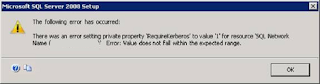
During the end of the installation for configuring a new cluster with the SQL 2008 Enterprise installation,  the following error was shown; The following error has occurred; There was an error setting private property 'RequireKerberos' to value 1 for resource 'SQL Network Name () Error: Value does not fall within the expected range. The solution to is to register the SPN of the user account you created to run the services. Open up the Command Prompt and type the following; setspn -L mynet\sqlservice setspn -s MSOLAPSvc.3/sqlcluster:cluster1 mynet\sqlservice setspn -s MSOLAPSvc.3/sqlcluster.mynet.local:cluster1 mynet\sqlservice setspn -s MSSQLSvc/sqlcluster:cluster1 setspn -s MSSQLSvc/sqlcluster.mynet.local:cluster1 sqlcluster is the name of my SQL cluster set during the SQL installation and cluster1 is the name of my instance. Once you have done this, make sure all computer accounts used in Cluster are enabled for Kerberos Delegation and that the user service...

InfoPath Form errors when pulling data from UserProfileService within SharePoint 2010

This summary is not available. Please click here to view the post.

Configuring Apple MACs for use in an enterprise environment

We currently own over 150 Apple computers, 20 which are MacBook Pro's and the remaining amount being iMAC’s. All of our MACs are unmanaged and require onsite assistance when issues occur. These are some of the issues we experience when using MACs in our enterprise environment; DNS resolution issues Proxy settings disappearing from the Network Settings for the Network Adapter. Constant bombardment of proxy authentication prompts once logged into the MAC for the first time using your Windows Credentials. There are two prompts for system HTTP & HTTPS and two prompts for the Safari Web Browser (HTTP & HTTPS). Safari Web Browser not set to the default home page for our company Printers have to be manually configured on the MACS Blocking of applications is too complicated for staff to manage (causes other issues with other programs) Attached network drives, home shares and memory sticks are not always visible on the users desktop All of the computers individuall...

Camino not authenticating with proxy

When using Camino to access the internet via a proxy which requests authentication, the default settings do not work as you are not prompted for credentials, so internet access is denied. . To enable Camino to ask for a username and password when requesting access to the internet; navigate to about:config set network.negotiate-auth.allow-proxies to false Now you should be prompted for your credentials when accessing a secure website. Good Luck!

Error Creating Visual Studio 2010 Silverlight Phone Application on Shared Drive

We have been experiencing issues creating projects within Visual Studio 2010 for Silverlight for Windows Phones where the project location is on a shared drive / resource. During the build, this error is displayed; C:\Program Files (x86)\MSBuild\Microsoft\Silverlight for Phone\v4.0\Microsoft.Silverlight.Common.targets(249,9): error : Could not load the assembly file:///p:\visual studio 2010\Projects\PhoneApp5\PhoneApp5\obj\Debug\PhoneApp5.dll. This assembly may have been downloaded from the Web.  If an assembly has been downloaded from the Web, it is flagged by Windows as being a Web file, even if it resides on the local computer. This may prevent it from being used in your project. You can change this designation by changing the file properties. Only unblock assemblies that you trust. See http://go.microsoft.com/fwlink/?LinkId=179545 for more information. It is possible to get this working by creating a new environment variable, system or user with the following data; COMPL...